Every PDF chore, done on your Mac.
Folio keeps fifteen tools on one contents page: PDF to Word and Excel, merge, split, rearrange, compress, watermark, add a password and sign. It works with no internet connection and no account, so your contracts and payslips never leave your desk.
Pay once · macOS 14+ · Apple silicon & Intel · ~5 MB download · Already bought? Download Folio
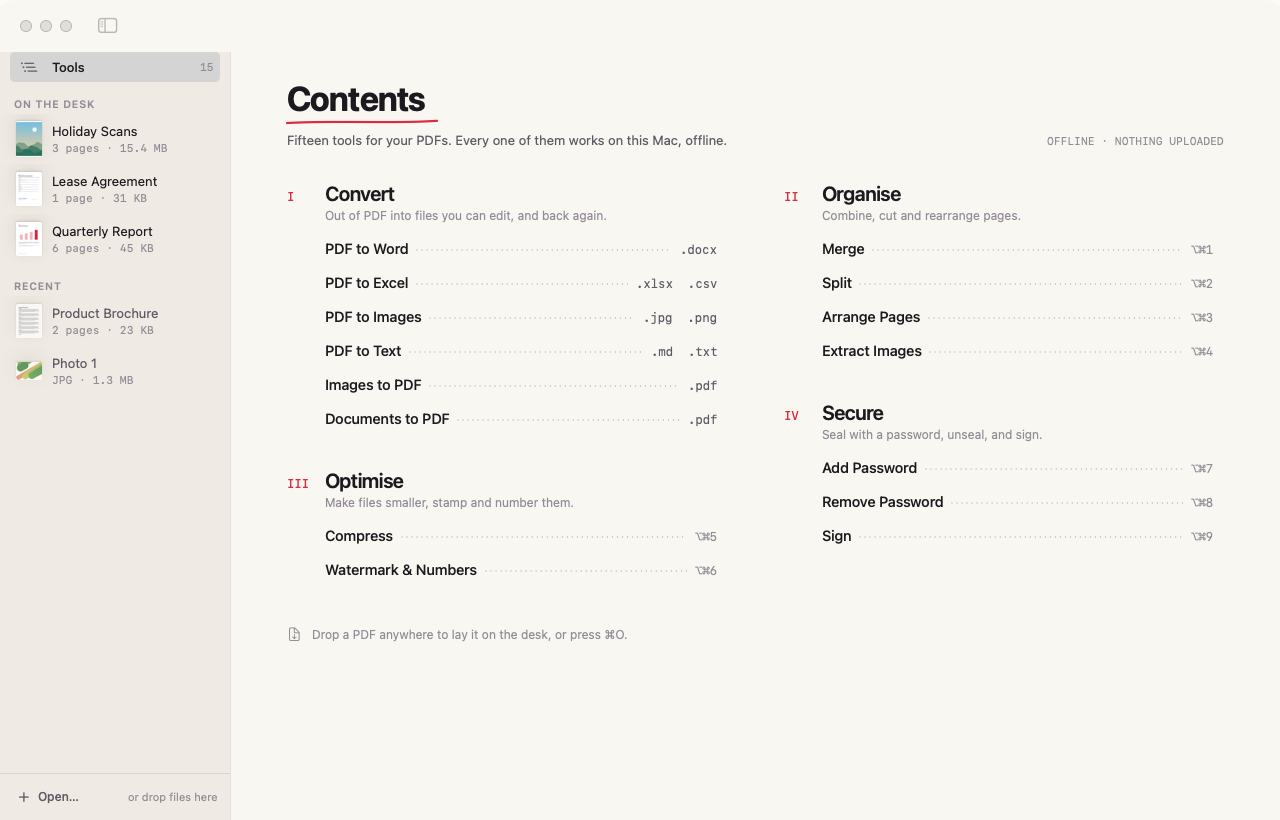
A working model, not a video — sample data. The PDFs here are drawn by the page and nothing is converted or saved: the page can’t see your files. The real Folio does all of this to your own documents, on your Mac.
- Pay once, no subscription
- No account, no uploads
- Never overwrites your original
- Native on Apple silicon & Intel
- 14-day refund
Fifteen tools, one calm window.
Lay a PDF on the desk, pick a tool from the contents, check the options, press the button. The result lands beside the original with a clear new name.
A contents page, not a maze
Every tool sits on one index in four chapters — Convert, Organise, Optimise, Secure. ⌥⌘ and a number jumps straight to the nine page tools.
Word and Excel you can edit
Lines become real paragraphs with sizes, bold and italic kept. Tables are rebuilt cell by cell, one sheet per page, with numbers that stay numbers. Or take Markdown, text or images.
Arrange pages by hand
See every page. Drag to reorder, turn with ⌘[ and ⌘], take pages out, undo anything. Each change is noted in red pen before you save.
Compression with a receipt
Three levels, from keeping text selectable to the smallest file, with the page before and after side by side. If a file can’t get smaller, nothing is saved.
Sign without printing
Draw with your trackpad or type your name in a handwriting style, drag it into place and resize it. The signature is flattened into the page, so it can’t be lifted off.
Split, merge, extract
Cut by page, into equal parts or by ranges like 1-3, 5, 8-. Join PDFs in the order you lay them on the desk. Save the pictures inside a PDF, repeats skipped.
Watermarks and page numbers
A diagonal or level stamp in your words and colour, plus numbers like “Page 1 of 9” at the foot or in a corner. The page on the desk shows exactly where they’ll go.
Passwords, both ways
Seal a PDF with standard encryption that Preview, Acrobat and browsers understand, with printing and copying allowed or not. Remove a password you know.
Clean PDFs from anything
Photos and scans become pages in A4, Letter or their own size, with or without margins. Word, RTF, HTML and text files are laid out into tidy pages.
Your original is never changed.
Folio only reads the file you give it. Every result is a new file with a word added to its name, and a number if that name is taken.
Save next to the original or into one folder you choose, then “Show in Finder” as soon as the job is done. The work happens in Apple’s own PDFKit, Core Graphics and Core Text, on your Mac.
Lease Agreement.pdfLease Agreement signed.pdfHoliday Scans.pdfHoliday Scans compressed.pdfQuarterly Report.pdfQuarterly Report edited.pdfQuarterly Report.pdfQuarterly Report.docxQuarterly Report.pdfQuarterly Report split/ · 3 filesEvery screen, light and dark.
Screenshots straight from Folio, with sample documents. Flip between light and dark.


What stays. What connects.
Tax returns, leases and payslips are exactly the files you shouldn’t hand to a website. Folio never uploads them.
Stays on your Mac
Every document, and everything Folio makes from it.
- ✓The PDFs and files you openRead on your Mac, never changed
- ✓Every new fileNext to the original, or in a folder you choose
- ✓Your recent filesA short list in Folio’s preferences
- ✓How you use itNo analytics or tracking in the app
Connects
Two small requests, over HTTPS.
- 1License checkYour key and an activation ID, to Dodo Payments
- 2Update checkApp name and version, to
folio.newmac.app
The full list, for every app, is in the privacy policy.
Pay once. Keep it.
One payment, no subscription. Choose how many Macs you’ll use Folio on.
3 Macs
For your home and work Macs
Checkout opens soon. The buttons above go live here the moment it does.
Every plan includes
- One payment, no subscriptionEvery feature, yours to keep.
- License key by emailSent the moment you pay. Activate in one click.
- Move between MacsUse “Deactivate this Mac”, then activate on the new one.
- Free updatesNew versions install themselves.
- 14-day refundNot for you? Read the refund policy.
- macOS 14 or laterNative on Apple silicon & Intel.
Already bought? Download Folio · .zip · Install help
Questions, answered.
Will PDF to Word look exactly like the original?
Folio rebuilds the text: paragraphs, font sizes, bold and italic. Complex layouts with columns, text boxes or decorative graphics are simplified, and pictures aren’t carried into the Word file. For a pixel-perfect copy, use PDF to Images.
Can it read scanned documents?
Not yet. Scans are pictures of text with nothing to select, so the text and spreadsheet converters have nothing to read. Merge, split, arrange, compress, password and sign all work fine on scans.
What do the compression levels do?
Light runs Apple’s Reduce File Size filter and keeps text selectable. Balanced and Strong redraw each page as a 150 or 96 dpi image, which shrinks scans and photo-heavy files dramatically but makes text unselectable.
I forgot the password to a PDF. Can Folio remove it?
No. Remove Password needs the current password; it saves an unprotected copy for when you’re tired of typing it, and leaves the original locked.
Can I open files by dropping them on the Dock icon?
Yes. Drop PDFs, images or documents on Folio in the Dock. If the open tool can use them they’re added straight away; otherwise Folio highlights the tools that can.
macOS says it can’t verify the developer.
Folio is distributed directly from this website. Here’s how to open it the first time.
Is there a free trial?
No. Use the working model at the top of this page, or watch the demo video, to see exactly how Folio works. If it turns out not to be for you, you can ask for a refund within 14 days — see the refund policy.
Can I use Folio on more than one Mac?
Yes. The 3-Mac and 5-Mac plans cover several Macs with one license key. Any license can move to a new Mac: choose “Deactivate this Mac” in Folio on the old one, then activate on the new one.
Comparing PDF editors for Mac? Read the guide.
Your PDFs, handled.
Fifteen tools that never upload a page. Pay once and keep them.